

 |
 |
 |
 |
 |
 |
Speech production and perception tools for real-time assessment, analysis and therapy
|
[Assessment Test Editor and Controller] |
|
SPEECH TESTING ON A MULTIMEDIA PC ASTEC is a new program for running speech tests on a multimedia PC. The tests can be audio and/or visual with lip reading. Tests are self pacing. Results and client data are stored in a data base. Analyses are automatic, can be printed out or cut and pasted to make special reports. There are two versions of ASTEC: the Test Controller and Database runs ready made applications such as VCV tests or the BKB sentence corpus. The Test Editor also provides for the rapid construction and editing of new tests.
In response to a randomised presentation of audio visual, Vowel-Consonant-Vowel cues the client clicks the perceived consonant with the mouse. At the end of the test a confusion matrix and information transfer rate calculations are automatically run, displayed, saved and can be printed out.
ASTEC Test Editor and Controller, Database and Report Writer ASTEC is a program which facilitates the creation of a wide range of speech tests. It is a full 32 bit Windows application using multimedia controls for the presentation of audio and visual stimuli. The syntax of the language supports both subjective tests of speech intelligibility, as well as direct reception speech measures. The Test Editor version of ASTEC is made up of four related modules. The test configuration module is used: to set up test protocols, to create the screen interface and to set conditions for stimuli file selection. Some parameters are used to specify the test, or experimental design (e.g. presentation mode, reaction time, number of repetitions allowed, the duration of the time out error delay). The screen interface, which determines the spatial organisation of the test design, is a mouse driven interface where the user can select, move, resize and associate captions with the different controls (e.g. scale button, message, frames, graphics window). This first module also provides a stimulus file selection procedure. The script editor module comprises an automatic script writing procedure that creates script files which can then be manually updated. The script language consists of a high level language for the rapid creation of speech tests. A number of script commands can be used to dynamically set the protocols, the screen interface and the stimulus file selection conditions, whilst the other commands concern the core of the test (e.g. stimulus output, pause, caption). The script interpreter controls the way each command is executed during the test managing the interaction between the client and computer. The data base management interface gathers information on subject, session and responses and stores this in an ACCESS database format. The associated browser enables results to be selected by subject session and test, and for results to be printed in the format of a report. Reports can be made on a selection of sessions. The database can be set up to parse an ASCII file created by another application and to write the selections to the ASTEC database. Some examples of tests already created: Audiovisual VCV tests. A presentation of 24 different consonants selected randomly from 5 different lists. Subject response by clicking mouse over on screen keypad. Results provided as confusion matrix and information transfer score. Stressed sentence test. Audio-visual stimuli. Response entered by test operator clicking key work buttons on their screen. Automatic information transfer score. Speech in noise tests. A demonstration has been prepared using script command to vary the level of signal to noise as a function of subject response. Documented examples of tests are provided and editing these provides a very quick way to create a new, custom test. Full information on Script structure, variables and commands is available. ASTEC requires a good multimedia PC. We would recommend a Pentium with 32M RAM. A CD ROM reader is necessary to load the program and stimuli files, and a fast graphics card or accelerator may be necessary to ensure sound /vision synchrony for large image sizes. ASTEC: Turnkey Test Controller, Database and Report Writer is also available to run ready prepared tests. It contains no editing functions. In this form ASTEC provides an easy way to run a test, to manage patient and test information and analyse and print results. |
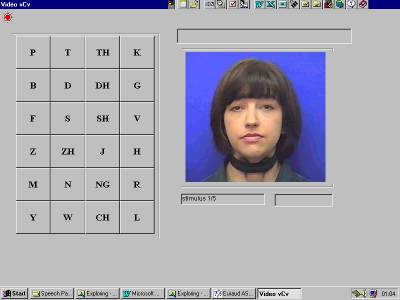 Example:
Audio-visual VCV test
Example:
Audio-visual VCV test 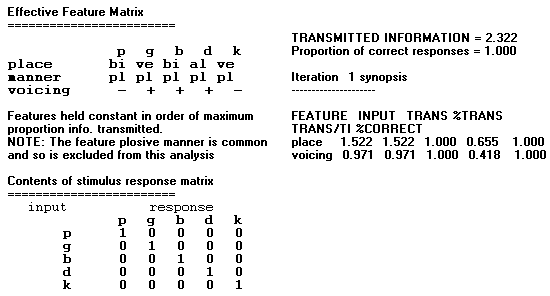

No1. Foundry Mews, London NW1 2PR United Kingdom
Tel: +44 20 7387 7793 Fax: +44 20 7383 2039
lx@laryngograph.com